Expand description
§Demo: styling
Node style presets, live per-node style editing, and the routing-anchor lifecycle.
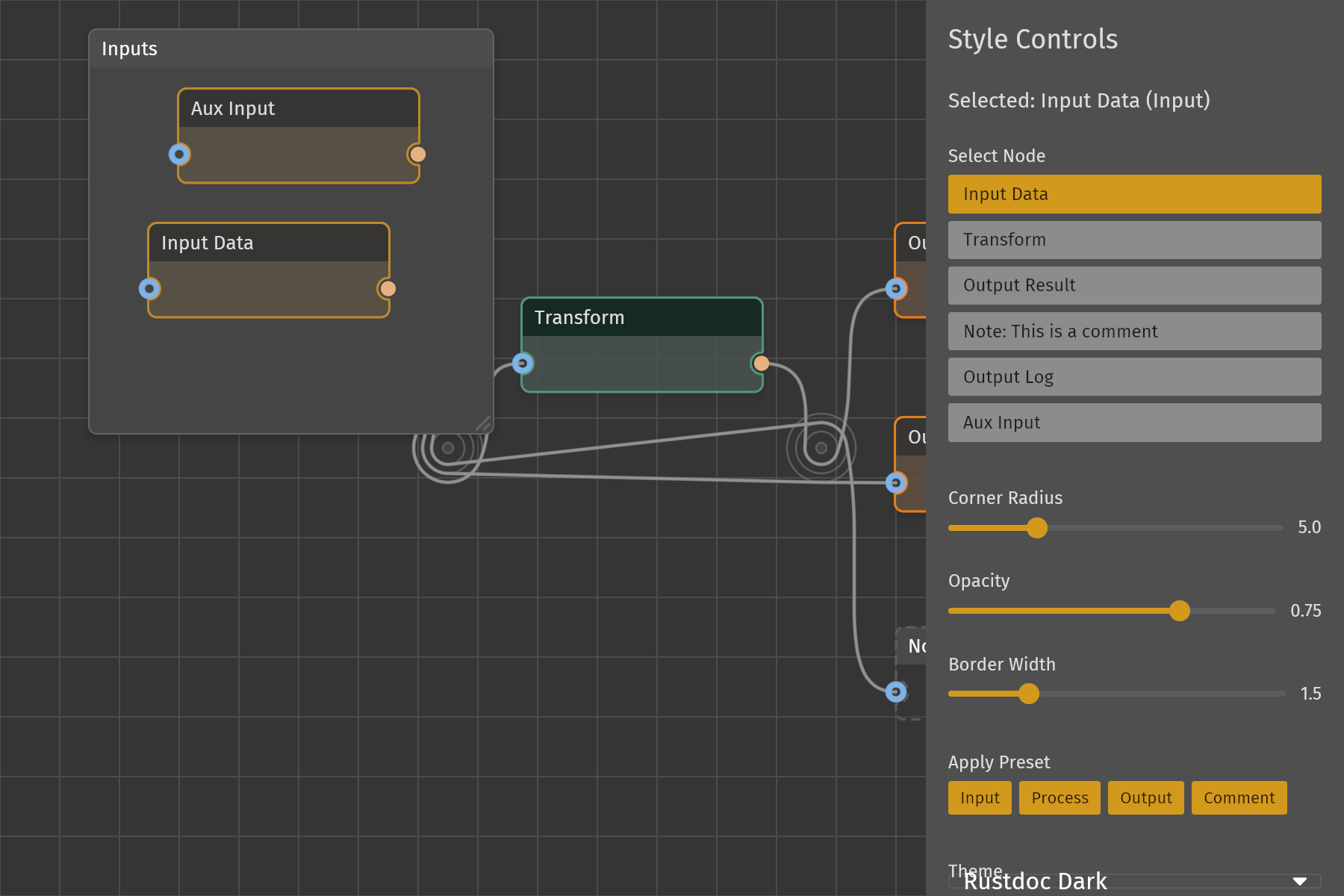
This demo shows how a host application owns node appearance in iced_nodegraph:
it keeps a style preset and a few override values per node in its own model,
resolves them into a NodeStyle from the node’s .style() closure, and edits
the overrides from a side panel while the graph stays interactive. It is also
the reference host for routing anchors: the widget derives every cable’s
geometry, and this application owns the anchors and the routes.
The whole application lives in src/lib.rs (the native main.rs calls into
it); src/nodes/mod.rs builds the node content.
§Features
- Style presets:
NodeStyle::input,process,outputandcomment, each a function of theme and status, picked for the selected node from the “Apply Preset” buttons. - Live style controls: sliders for corner radius (0-20), opacity (0.1-1.0), and border width (0.5-5.0, the border pattern’s thickness). Each change writes the selected node’s overrides, which the style closure lays over the resolved preset.
- Theme switching: a
pick_listover ten iced themes (Dark, Light, both Catppuccin variants, Dracula, Nord, both Solarized, both Gruvbox). The starting theme is CatppuccinFrappe. - Pin styling by direction:
styling_pin_stylecolors outputs orange and everything else blue overdefault_pin_style(theme, status). - Content follows style:
determine_content_stylepicks the title-bar preset from the node’s fill color and reuses the node’s own corner radius and border thickness, so the header geometry matches the body. - Selection feedback: every preset builds on
default_node_style(theme, status), so aNodeStatus::Selectednode takes the accent border and halo ring and highlights like every other node. - Grid background: a
TilingBackground::gridlayer overdefault_graph_style(theme). - Routing anchors: two anchors sit under the Transform node with three
cables on each; two of those come from different inputs and run through both
anchors, so the stretch from the first anchor to the second carries a pair.
The pair wraps the two anchors in opposite orders of tightness, so their ring
order is the one thing neither anchor can settle by itself: candidate ring
orders are built and measured and the one that crosses least is kept, so
cables that fly the stretch between two anchors keep to their own side of it.
The host holds
anchors: Vec<(usize, Point)>and aroute: Vec<usize>per edge, and applieson_anchor_create/on_anchor_move/on_anchor_delete/on_route_attach/on_route_detach. Anchors have their own id space, so they are minted from zero andnext_anchornever has to know what the nodes use. - Anchor garbage collection:
drop_unused_anchorsremoves any anchor no route names any more, so detaching an anchor’s last cable makes it disappear. The library keeps an anchor as long as the host pushes it; “last cable out, anchor out” is this application’s policy, not the widget’s. - Frame: a
Node::frame()backdrop titled “Inputs” sits behind the two input nodes. It renders behind every other node, takes a press only where none of them covers the point, and carries the nodes fully inside it when dragged. The host owns its rectangle and applies the reported move and the grip’s resize, the same as for any other node.
§Demo Graph
Six nodes: Input -> Transform -> Output Result, a comment node fed from the input, and a second source feeding a second sink:
| Node | Preset |
|---|---|
| 0 Input Data | Input |
| 1 Transform | Process |
| 2 Output Result | Output |
| 3 Note: This is a comment | Comment |
| 4 Output Log | Output |
| 5 Aux Input | Input |
Plus two anchors under the Transform node: A is id 0 at (300, 300), B is id 1 at (550, 300). Edge 0 (Input -> Transform) routes through A, edge 1 (Transform -> Output Result) through B, and edges 2 (Input -> Note) and 3 (Aux Input -> Output Log) through A and then B. So each anchor carries three cables on three rings, and the stretch between A and B carries two of them.
Those two are the scene: at A edge 3’s angular interval - the angle its two neighbours subtend at the anchor centre - is contained in edge 2’s, and at B it is the other way round. An anchor deciding on its own seats the contained interval inside, so it would seat the two one way at A and the other way at B and cross them between the anchors. They do not cross there: candidate ring orders are built and measured and the one that crosses least is kept, so cables that fly the stretch between two anchors keep to their own side of it. Edge 0 is where that shows at A. Its interval is the smallest of A’s three, so containment seats it innermost - and interval and arc being anti-correlated, it is also the cable that goes furthest round its ring. It ends up on the widest of the three rings anyway, because the exchange that cleared the corridor displaced it. Nothing weighed edge 0: a candidate only ever builds the cables that share two anchors, and edge 0 wraps one, so its ring is fallout from the pair’s fix rather than a price paid for it. Every anchor lies between the pins of every cable that wraps it, and every cable meets its anchors in increasing x, so nothing doubles back.
§Controls
- Click a node button in the right panel to pick the node the sliders and presets act on. The sliders show that node’s overrides.
- Drag a node (or a selection) in the canvas to move it.
- Drag from a pin to another pin to connect; each node has one input pin on the left and one output pin on the right.
- Scroll to zoom, right-drag to pan. The root README has the full default control table.
- Drag a cable mid-run to place a new anchor where you release it; drag a cable at its wrap to pull it off that anchor. Dropping either drag on an existing anchor attaches there during the drag, and every cable at that anchor is reseated, the newcomer included - it can land on any ring, the innermost among them. Right-click an anchor’s core to delete it, or a wrap to detach just that cable. Drag a core to move it. A right-DRAG still pans, wherever it starts.
- Drag the “Inputs” frame on any spot no node covers to move it and the nodes inside it; drag its bottom-right grip to resize it.
The 280px control panel is wrapped in opaque, so pointer events over it do not
reach the graph underneath.
§Running
cargo run -p demo_styling§Library API Exercised
NodeGraph with on_connect / on_disconnect / on_move / on_select /
on_anchor_move / on_anchor_create / on_anchor_delete / on_route_attach /
on_route_detach / graph_style, the bulk adders nodes(..) / anchors(..) /
edges(..), node(..).selected(..).style(..).pin_style(..),
edge(..).route(..), anchor(..), Ids with a custom marker, PinRef,
NodeStyle, PinStyle, GraphStyle, TilingBackground, Pattern,
NodeStatus, PinStatus, PinDirection, PinInfo, default_pin_style,
default_graph_style, and the pin! macro.