Expand description
§Demo: interaction
Connection validation with typed, directional pins.
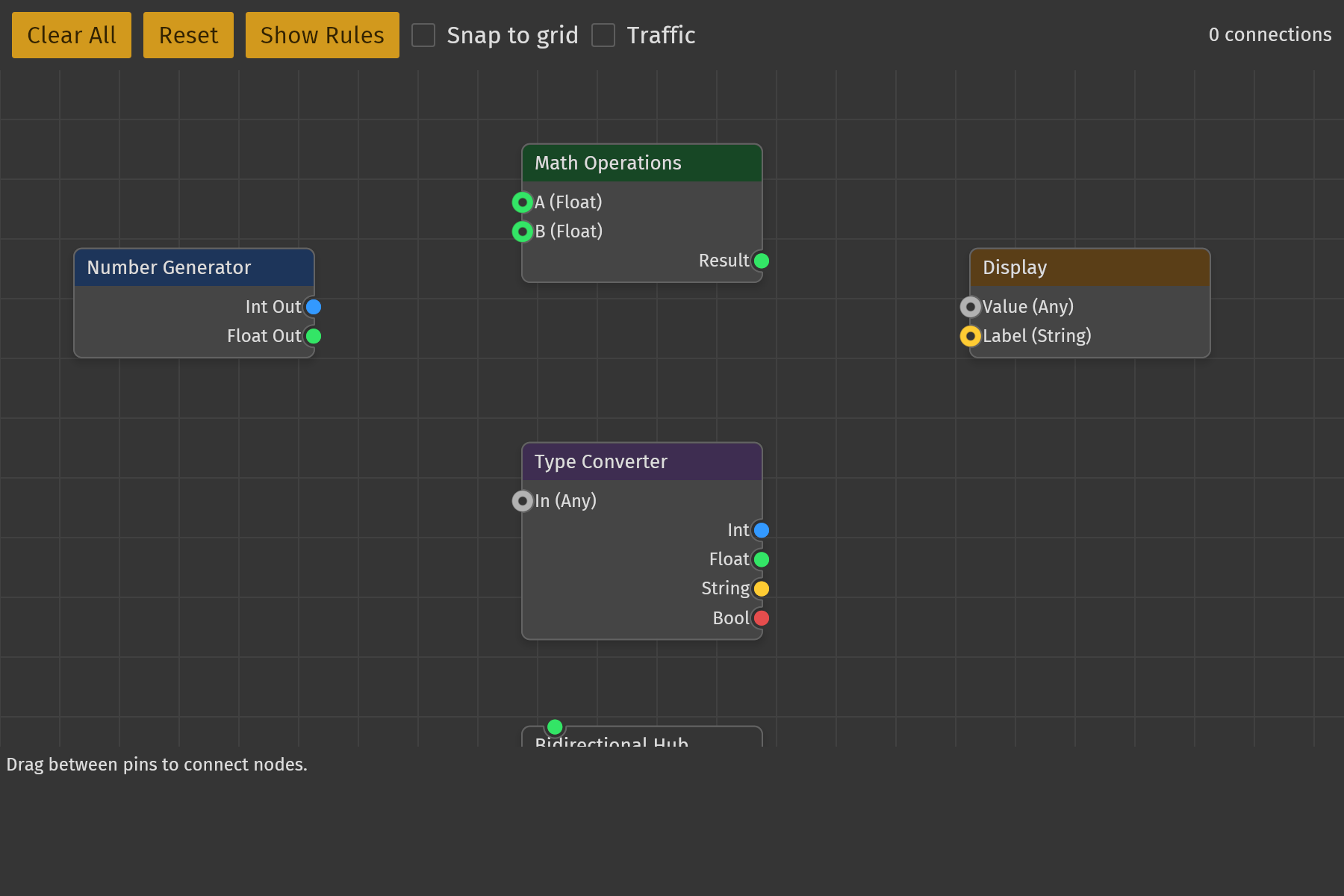
This demo shows how to enforce connection rules in iced_nodegraph: directional
data flow, type compatibility, single-connection constraints, duplicate and
self-loop rejection, and live snap feedback while dragging an edge.
The whole application lives in src/lib.rs: main.rs runs it as a desktop
window, and the gallery boots it in the browser through demo_common::Demo.
§Features
- Directional pins: input-only (left), output-only (right), and bidirectional (top/bottom). Input-to-input and output-to-output are rejected.
- Typed pins: Integer, Float, String, Boolean, and Any.
Anyis compatible with everything; Integer and Float convert implicitly. - Single-connection constraints: some pins accept only one edge.
- Duplicate rejection: the same pair cannot be connected twice.
- Self-loop rejection: a pin cannot be wired to itself.
- Live snap feedback:
can_connectvalidates direction, type, and self-loops during the drag so the edge only snaps to compatible targets. Full validation (including single-connection and duplicate rules) runs on release and is reported in the feedback log. - Selection and group move: nodes can be selected and dragged as a group.
- Feedback log and rules panel: every accepted or rejected attempt is logged; toggle the rules reference with “Show Rules”.
- Snap to grid: the toolbar toggle puts every node drag on a 40-unit world grid; holding Alt ignores it for as long as it is held.
- Traffic: the toolbar toggle sends a particle in the source pin’s colour down every edge every 0.6 s; each glides to the input pin and vanishes. The host pushes each particle every frame with its birth time and the widget draws it where its age puts it, so the demo stores birth times, never positions.
§Demo Graph
| Node | Pins |
|---|---|
| 0 Number Generator | Integer out, Float out |
| 1 Math Operations | Float in A (single), Float in B (single), Float out |
| 2 Type Converter | Any in, Integer out, Float out, String out, Boolean out |
| 3 Display | Any in, String in |
| 4 Bidirectional Hub | Float, Integer, Any, String (all bidirectional) |
§Controls
- Drag from a pin to a compatible pin to create a connection.
- Drag a node (or a selection) to move it.
- Scroll to zoom, right-drag to pan.
- Ctrl/Cmd+L selects all: the demo rebinds
select_alloff the default Ctrl/Cmd+A throughNodeGraph::keymap. - Clear All removes every connection; Reset restores the initial graph; Show Rules toggles the rules reference.
- Snap to grid toggles the 40-unit drag grid; Alt ignores it while held.
- Traffic toggles the particles travelling along the edges.
The root README has the full default control table.
§Connection Rules
- Output and bidirectional pins may send; input and bidirectional pins may receive.
- Types must be compatible (same type, or
Any, or Integer to/from Float). - Single-connection pins reject a second edge.
- Duplicate connections are rejected.
- A pin cannot connect to itself.
§Running
cargo run -p demo_interaction§Implementation Notes
validate_connectionreturnsResult<String, String>so accepted and rejected attempts produce a human-readable feedback message.can_connectis the lighter, state-independent predicate used for the live snap; it mirrors the direction, type, and self-loop checks.- The validation logic is plain data over a
pin_registrymap and is easy to lift into a real application.